LAN vs. WLAN: Which is best for your business?

There’s a common debate between a wired Local Area Network (LAN) vs. Wireless Local Area Network (WLAN) for business network operations. What’s the difference between WLAN and LAN? Which is best for your business based on size, needs, and flexibility? The short answer is that a LAN is great for smaller office locations with a preference for faster connection speeds, better security, and lower ongoing costs. A WLAN is great for larger office locations with a preference for lower upfront costs, mobility, and flexibility.
What is LAN?
LAN is a network of computers and devices connected by physical cables within a local—or size-limited—area. The size of the area is limited by the length of the cables and the location of your cable ports.
For example, a simple LAN might be two or three desktop computers and a printer all wired together. They might also have a central server that they’re wired to. A server is a computer that provides data and resources to the other devices on the network. These devices connected to the server are called clients.
Because the devices, or clients, on a LAN are connected with cables—typically Ethernet cables—LANs can offer higher speeds and more reliable connections. They are ideal for businesses with fixed workstations and minimal mobility needs.
What is Ethernet? Ethernet describes cables as a standard communications protocol used to connect devices, including computers, routers, and switches in a network. They convey the data from device to device.
What are the pros and cons of a LAN?
What is the nature of your business and how you work? Do you engage in data-heavy tasks and handle data that needs tighter security? Are your workers in-office? You might consider a LAN.
The pros of LAN are:
- LAN often has less expensive ongoing costs—your costs will depend on the number and location of the devices needing to be connected.
- Wired networks offer stable, high-speed connectivity, ideal for data-heavy tasks.
- Greater security—LAN provides greater protection from cyber breaches as well as from interference from other wireless signals or structural features of the building that block frequencies.
The cons of LAN are:
- Installation and upgrades require extensive cabling and infrastructure, adding time and upfront expenses as you expand your network.
- Devices must be physically connected to cable ports, limiting the mobility of connected devices.
- Cable lengths limit the size of your network without infrastructure upgrades.
In short, LAN provides fast and reliable connectivity at the small cost of installation headaches and limited range. But what if there was a way to have a strong connection without being chained to an Ethernet cable?
What is WLAN?
WLAN is a network of computers and devices connected by the radio frequencies (like Wi-Fi) of a wireless signal broadcast within a local area. The size of the area covered can be greater than that of a LAN because devices do not need to be connected by physical wires to the network.
For example, a simple WLAN might be a router that broadcasts wireless radio frequencies to desktop computers, laptops, smartphones, a tablet, a printer, and a central server. It might cover 10 rooms on a single floor or a dozen or more rooms spread across multiple floors.
Because the devices on a WLAN are not connected with cables, they offer greater mobility and a greater coverage area. Because of their mobility and flexibility, WLANs are ideal for growing or larger businesses, businesses with remote workers, or businesses with dynamic office space.
What are the pros and cons of a WLAN?
Consider your business and how you work. Do you engage in data-light tasks? Do you require lighter security for the information you transmit? Do you work in an office that has 5+ rooms and perhaps spans multiple floors? Are your workers a mix of in-office and remote? You might consider a WLAN.
The pros of WLAN are:
- It’s easy to set up and scale with minimal infrastructure requirements.
- WLAN supports mobility by allowing employees to connect from anywhere in the office space covered by the wireless signals.
- With a wider range, WLAN allows for a greater area of coverage.
The cons of WLAN are:
- Wireless networks can be slower and less reliable due to signal interference or network congestion.
- WLAN can be more vulnerable to security risks, like unauthorized access.
- Connectivity issues may occur due to potential interference of the wireless signal.
WLAN provides many of the benefits of a LAN without the need for extensive cable infrastructures. Which internet network type is right for your business, however, is another question.
How to choose the right setup for your business
As we’ve explored LAN vs. WLAN, we’ve seen some of the key differences between a wired (LAN) vs. a wireless (WLAN) connection. LAN offers greater signal stability and security while WLAN offers greater coverage range, mobility, and flexibility. Now, let’s take a deeper dive into comparing the difference between LAN and WLAN.
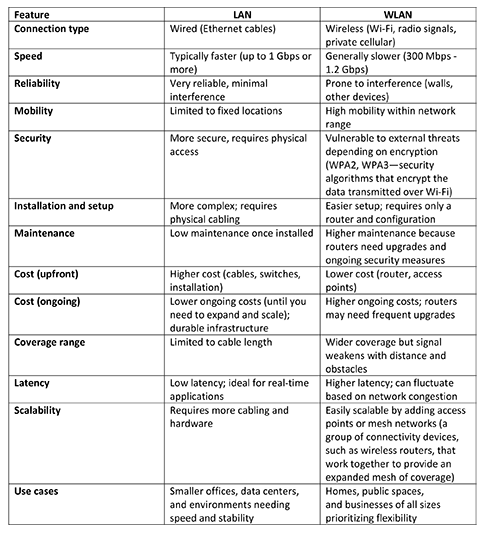
When it comes down to it, the differences in these network types and which to choose revolve around your individual use cases. Each business has its own unique needs, which may even include the different types of WLAN connectivity.
Common types of WLAN connectivity
WLAN uses wireless signals to link devices in a network. Two of the common types of wireless connectivity used in a WLAN are Wi-Fi and private wireless.
Wi-Fi is perhaps the first thing that comes to mind when you hear the phrase “wireless connectivity.” Wi-Fi is a radio signal that allows devices to connect to the internet or each other. An example of this is AT&T Business Wi-Fi, a cloud-managed Wi-Fi solution. You might consider Wi-Fi if cost is a key consideration for your WLAN.
Another type of wireless connectivity is a private wireless network, or private mobile connection. This is a standalone network (it’s not connected to the public cellular network) that is owned and operated by a particular organization or group. You might consider private wireless if security is a key consideration for your WLAN, or if you have a larger area to cover. WLAN can cover more access points than Wi-Fi alone—Wi-Fi needs 12 access points to cover the same area as one cellular access point.1
What is a WAN?
A Wireless Area Network, or WAN, is typically composed of several LANs or WLANs and covers a wider geographical area than a Local Area Network – LAN. We mention WAN here because it’s the logical extension of a LAN as your organization grows and expands. And just like you can have a wireless LAN, you can have a wireless WAN. You might consider a wireless WAN if your WLAN has trouble scaling to meet the number of business locations you’re adding.
Hybrid LAN/WLAN
As the name implies, a hybrid LAN and WLAN solution uses both wired and wireless technologies to connect devices on its network. You might consider a hybrid solution if either a LAN by itself or a WLAN by itself cannot meet your diverse networking needs.
Adding WAN capability to your network can greatly expand the geographic area your devices can connect within. It also presents as a scalable option that can grow as your business does.
LAN vs. WLAN: How to choose the right setup for your business
If you’re deciding between a LAN vs. a WLAN, consider each network style’s differences and how each can adapt to your business. LAN is great for smaller locations with a preference for lower ongoing costs, connection speed, and security. WLAN is great for larger locations with a preference for lower upfront costs, mobility, and flexibility. And a hybrid LAN/WLAN will allow you to access the strengths of both.
Assess the physical office space that you are trying to connect, the speed and latency requirements you need to meet, the security level you are comfortable with, and the mobility your team needs. Based on your assessment, you should have an indication of which network setup is right for you.
Learn more about AT&T Business Wi-Fi solutions. To connect with an expert who knows business, contact your AT&T Business representative.
Why AT&T Business
See how ultra-fast, reliable fiber, protected by built-in security, and 5G connectivity give you a new level of confidence in the possibilities of your network. Let our experts work with you to solve your challenges and accelerate outcomes. Your business deserves the AT&T Business difference—a new standard for networking.
1Matt Addicks, “Why Wireless LAN Should No Longer Mean Just Wi-Fi,” Network Computing, August 21, 2024.



Share
Share this with others