Use the AT&T Enhanced IP Flexible Reach portal
To access the AT&T Enhanced IP Flexible Reach portal, follow these steps:
-
Log in to Business Center.
-
On the dashboard, you'll see the IP Flexible Reach widget. Choose one of these options:
-
-
Dial plan - Opens the IP Flexible Reach Portal homepage.
-
Manage administrators – Let's you create, manage, and delete Enterprise, Group, and Department Administrators.
-
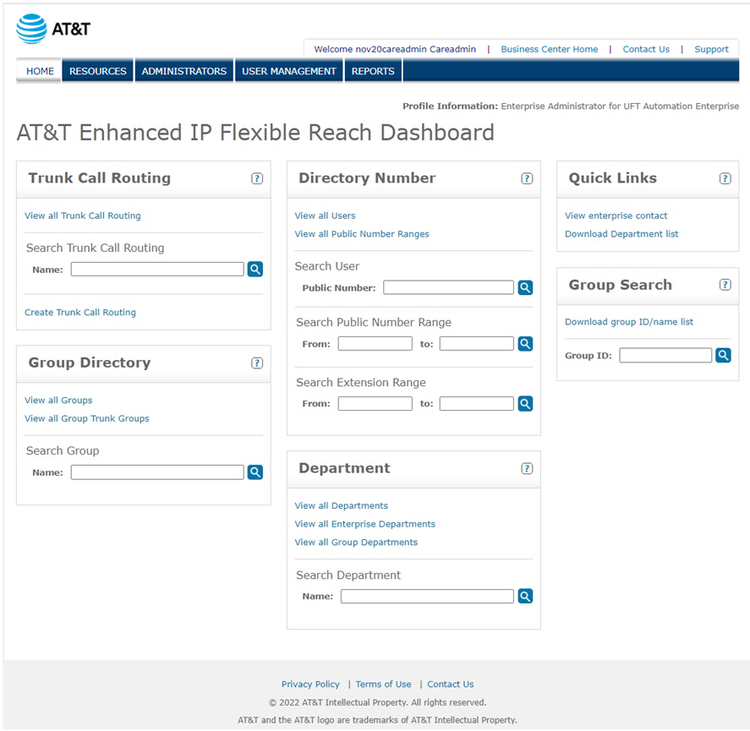
Navigation
To manage Resources, Administrators, or Users, from the main menu, select one of the following tabs:
-
RESOURCES - manage trunk call routing
-
ADMINISTRATORS - manage administrators
-
USER MANAGEMENT - manage users
-
REPORTS - view and create reports
-
Business Center - go to the Business Center dashboard
-
Contact Us - view your enterprise contacts
-
SUPPORT – IP Flexible Reach portal support
-
Home - return to the portal homepage
Trunk Call Routing
On the portal homepage, select Trunk Call Routing
-
Search for Trunk Call Routing name - type a trunk call routing name and click the magnifying glass
-
View the trunk call routing list - click Trunk Call Routing > View all Trunk Call Routing
-
Create new trunk call routing schemes - click Create Trunk Call Routing
Group Directory
On the portal homepage, click Group Directory.
-
Find a group- enter the group name in the search field and click the magnifying glass.
-
View all groups - click View all Groups.
-
Find all group trunk groups - from Group Directory, click View all Group Trunk Groups
Directory Number
On the portal homepage, click the Directory Number.
-
To view a list of users and their numbers, click View all Users.
-
To view a list of public number ranges and their associated groups, click View all Public Number ranges.
-
To search for an individual number:
In the Search User Public Number field, enter a public number, then click the magnifying glass. (A public number is a phone number dialed from outside the enterprise that routes the call to a private branch exchange (PBX), referred to as a telephone number.)
-
To search for a range of public numbers:
In the Search Public Number Range From, enter a public number, then enter a second public number in the To field, then click the magnifying glass.
-
To search for a range of extensions:
In the Search Extension Range From field, enter an extension, then enter a second extension in the To field, then click the magnifying glass.
Department
On the portal homepage, click Department to view all departments or search for a department.
-
To search for a department, enter a department name, then click the magnifying glass.
-
To view departments, select one of the following:
-
View all Departments
-
View all Enterprise Departments
-
View all Group Departments
-
Quick Links
From any page in the portal, you can use Quick Links to:
-
View enterprise contacts
-
Download department list
Group Search
You can use Group Search to search for a group name.
-
In the search, enter the group ID, then click the magnifying glass.
-
To download a list of group names and IDs, click Download group ID/name list.