Search and Download Lists
Easily search and download lists of users, groups, departments, and administrators with the IP Flexible Reach portal.
Search Tools
You have two options for searching - standard search tools and single field search tools.
Standard Search Tools
Standard search tools appear on most list pages throughout the portal.
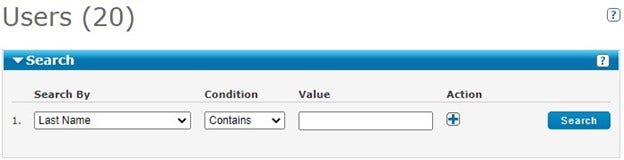
To open the tool, click Search.
-
Select a search term in the Search By list.
-
Choose a search modifier in the Condition list.
-
Enter a search value or select a value from the list in the Value field.
-
Click Search to show the results. If more than 1,000 records appear in the results, try using a different search term.
-
Click the plus sign to add search criteria.
-
Click the minus sign to remove search criteria.
Single Field Search Tools
Use single field search tools to look for a group ID, a specific phone number, or a user's name.
- In the Search field, enter a value and click the magnifying glass.
Search from the IP Flexible Reach portal homepage
From the homepage, you can search for trunk call routing schemes, telephone numbers, extensions, groups, group names, and departments.
Search for Trunk Call Routing Schemes
From Trunk Call Routing, you can:
-
Search for a trunk call routing name.
-
View all Trunk Call Routing
-
Create Trunk Call Routing
Search for a public number
- From Directory Number, click Search User Public Number.
Search for a range of public numbers
- From Directory Number, click Search Public Number Range From and enter a public number, then enter a second number in the To search box.
Search for a range of extensions
- From Directory Number, click Search Extension Range From and enter an extension, then enter a second extension in the To search box.
Search for Groups
-
In the Group Directory search box, enter a group name.
-
Group List - to see, search, and edit groups
-
Group Trunk Groups - to see, search, and edit group trunk groups
Search for Group Names
On the portal homepage, click Group Name Look-up to find a group name with the group ID.
- Click Group Search, enter a group ID.
Search for Departments
-
Click Department, enter a department name.
-
You can also use the Department List page to see, search, and edit groups and search for enterprise and group departments.
Download lists
Throughout the portal, you can download lists of data.
- Click the list name. When the File Download window opens, click Save.
Available lists to download:
Link | What it contains | Where to find it
- Portal Homepage
- Group Search tile
- Portal Homepage
- Quick Links tile
- Department List page
- Portal homepage
- Directory Number Search tile
- View all Public Number Ranges