Order status overview
We’ve made it easier for you to check your order status in AT&T Business Center. Use the Orders widget to get the status of your orders and their milestones in the enhanced Business Center order status view. For a list of products supported by the enhanced Business Center order status, click here.
NOTE: Orders can take up to 8 hours to appear online.
Order details
You can view the details associated with your order, including customer name, service address, service, order type, and port speed/access speed.

Order status summary
You can track your order’s progress in phases:
- Order submitted
- Access circuit schedule confirmed
- Access installed and circuit ready
- Equipment delivered
- Service activated
- Billing initiated
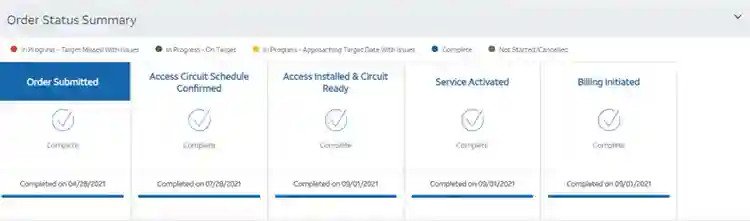
Note: Not all phases apply and are dependent on your order.
Order detail information
You can view details for your order, such as:
- Critical dates
- Order information
- Circuit information
- Logical information
- WAN information
- LAN information
- Equipment information
- Scheduled activation details
- Communication
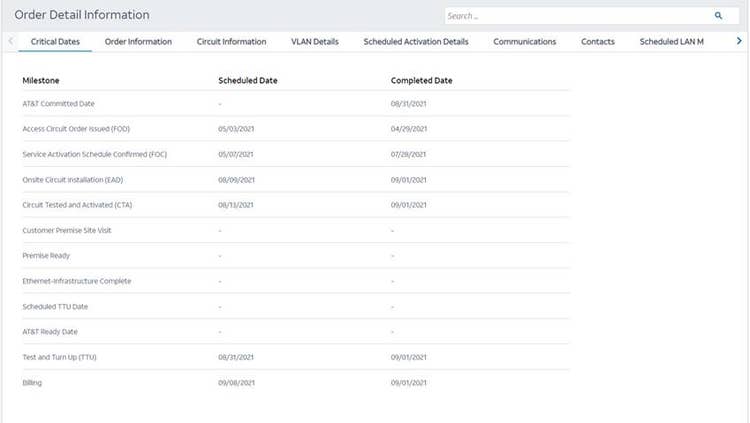
Note: Detail categories may differ per order.
Inquiries
You can submit order status inquiries, review logged inquiries, and update existing inquiries.

For more information, see Submit an order status inquiry.