Use the AT&T IP Flexible Reach Customer Portal
AT&T provides Enhanced IP Flexible Reach users with a portal where you can manage functions and features for your phone from anywhere you have an Internet connection.
Customer Portal
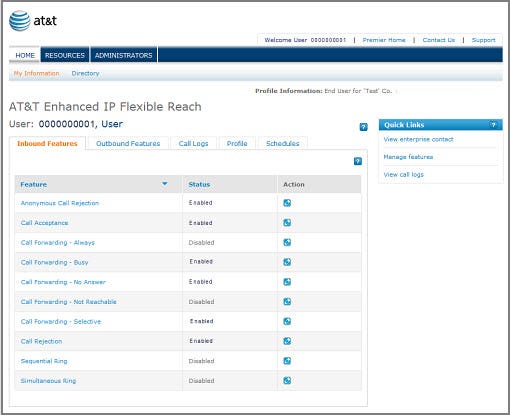
The AT&T IP Flexible Reach Customer Portal is the central place from where you can manage your features, edit your profile information, view your call logs, view your enterprise contacts, and more.
To access the Customer Portal, you must first log in to Premier.
Navigation
The Customer Portal makes it easy to manage your IP Flexible Reach settings, get more information, or find contacts.

- To see your enterprise contacts (people who can help you with AT&T IP Flexible Reach), click RESOURCES in the main menu bar. The Enterprise Contacts page appears. From here you can get the names, email addresses, and phone numbers of your enterprise contacts.
- To search for and view administrators, click ADMINISTRATORS in the main menu bar. The Administrators page appears. From here you can search or browse for Enterprise Administrators or Group Administrators and view their contact information.
- To go to the Premier home page, click Premier Home.
- To get help from an enterprise contact, click Contact Us at the upper-right of the page. The Enterprise Contacts page appears, and you can select a contact.
- To get support, click Support at the upper-right of the page. The Administrative Portal Help page appears.
- To see and edit your personal information, click My Information in the Customer Portal.
- To search or browse a list of other users, click Directory in the Customer Portal.
- To get back to the Customer Portal home page (and your User page) at any time, click Home.
User Page
The User page, which you see when you open the Customer Portal, has five tabs: Inbound Features, Outbound Features, Call Logs, Profile, and Schedules.

- To view or edit your assigned call features, click Inbound Features.
- To view your account codes and dial restrictions, click Outbound Features.
- To view your call logs, click Call Logs. You can also sort the logs by call type.
- To view or edit your user profile, click Profile.
- To view or edit your user schedules, click Schedules.
Quick Links
Use the Quick Links tile to see your enterprise contact information, manage your features, or view call details.
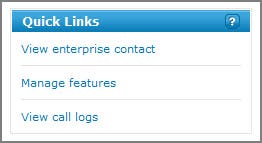
To use Quick Links
At the upper-right of the page, under Quick Links:
- To see your enterprise contacts, click View enterprise contact.
- To manage your assigned features, click Manage features.
- To view your logged calls, click View call logs.